

FASCO: From Buyer Conversations to Sales-Ready Leads
Designing an AI-powered wholesale buying journey that turns product questions, bulk orders, and buyer preferences into qualified leads for human follow-up.
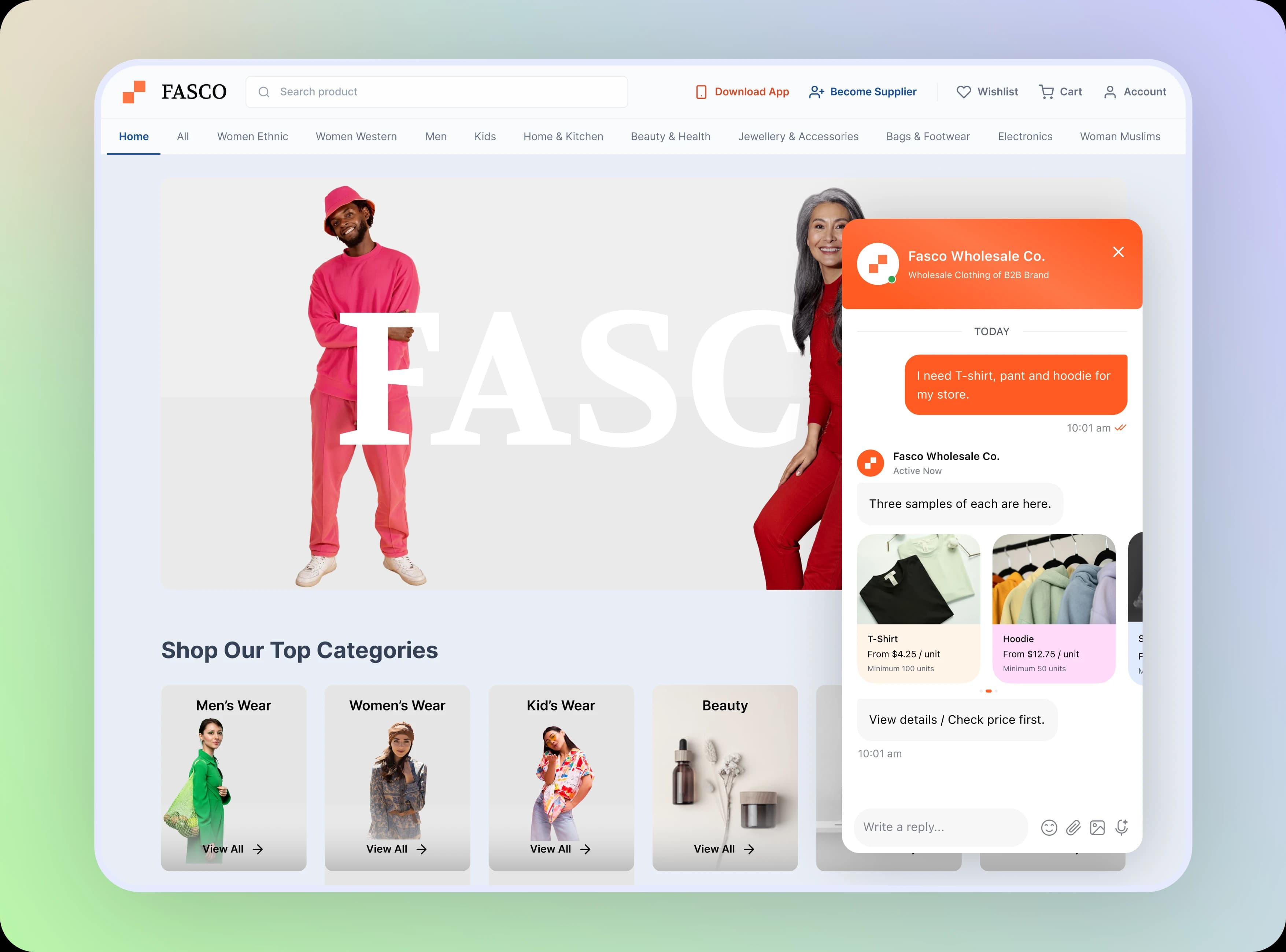
Wholesale buyers rarely arrive with a complete order. They ask about product options, minimum quantities, pricing and delivery before they are ready to speak with sales.
FASCO combines a retail storefront with a conversational AI assistant that guides buyers through product selection, order details, estimates, and sales follow-up.
Here systematically explores the supplied interface and the design decisions behind the buyer-to-sales journey. Live conversion and performance results were not provided.
Our goal was to turn open-ended wholesale inquiries into clear, structured, and consent-based sales opportunities.
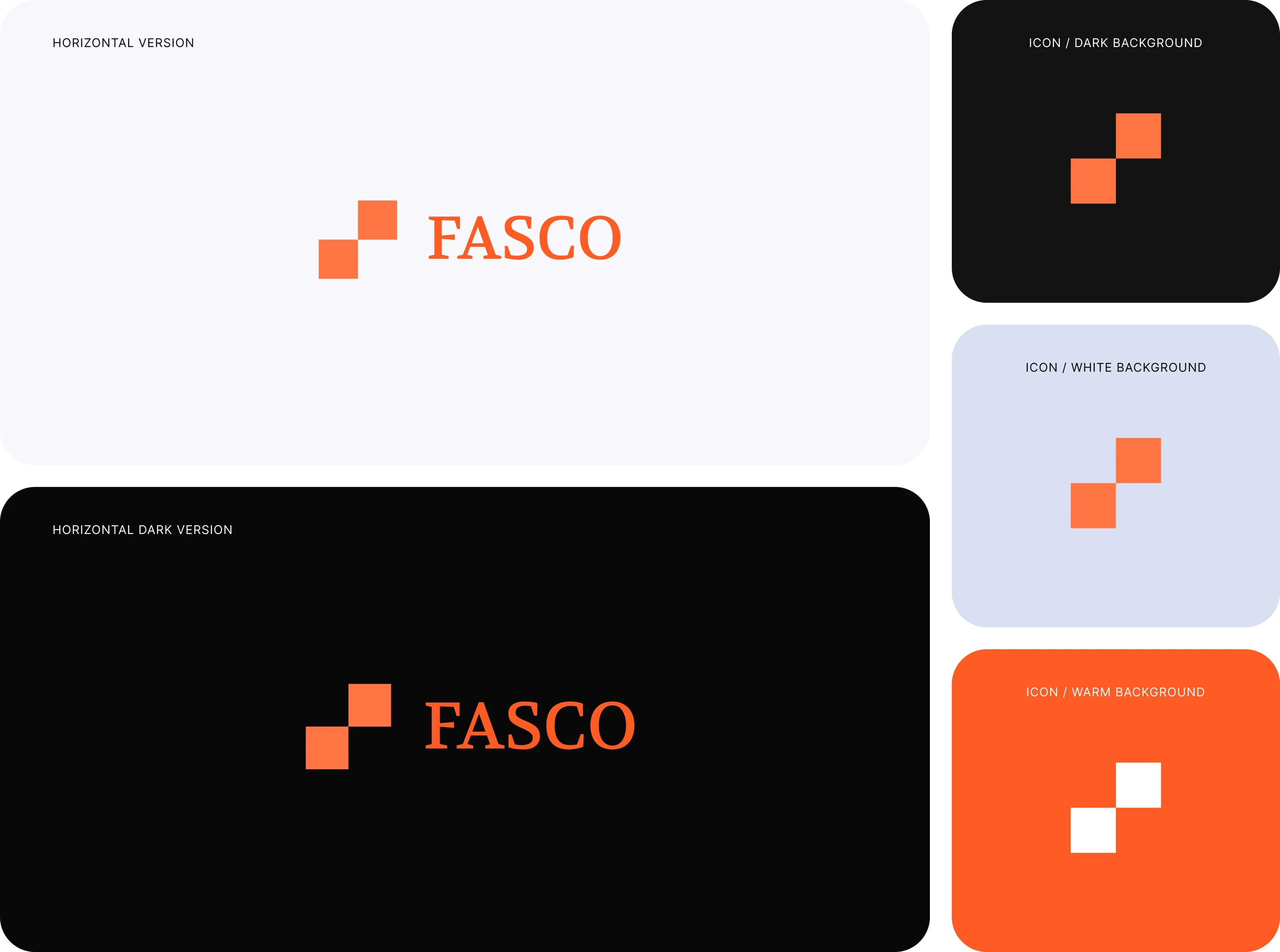
Logo Formation
FASCO uses a clean, distinctive visual identity to connect its wholesale storefront, AI sales assistant, and CRM experience.
The logo represents a modern approach to wholesale commerce, while its simple form and orange-and-neutral color palette create a recognizable identity across the platform.
This study explores the FASCO logo, its visual elements, and its applications across the wholesale buying and sales experience.
The Problem: Wholesale Inquiries Lose Context
Buyers explore products, quantities, size mixes, pricing, and delivery in separate questions. Sales teams need the whole picture, not just a contact number.
Without structured capture, buyers repeat details and sales representatives begin follow-up without a reliable order summary.

The experience should guide buyers from product discovery to structured order details, clear estimates, and consent-based handoff to sales team.
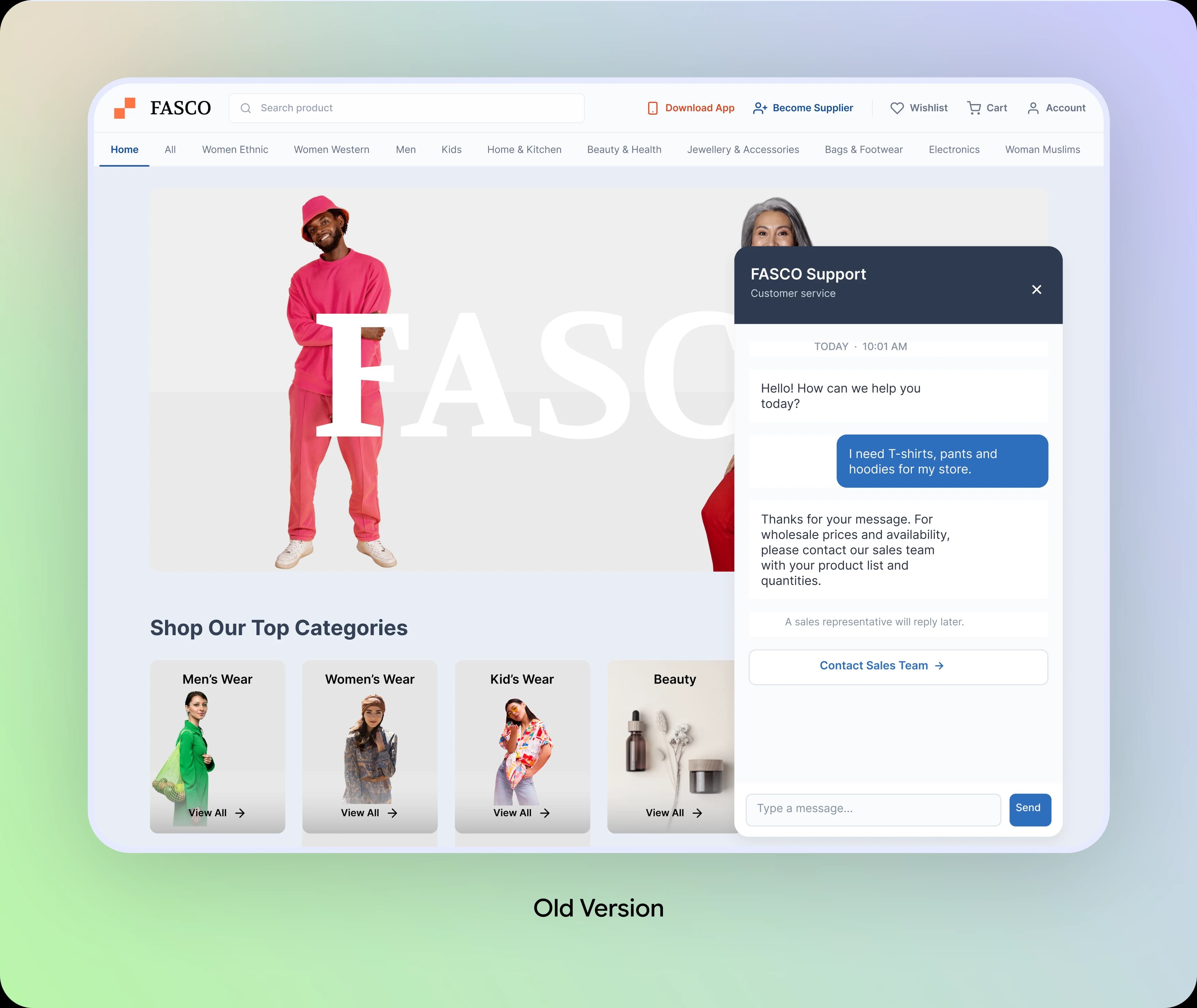
The Problem: Wholesale Inquiries Lose Context
Buyers explore products, quantities, size mixes, pricing, and delivery in separate questions. Sales teams need the whole picture, not just a contact number.
Unstructured Wholesale Requests
Buyers need a simple way to describe products and quantities.
Product Details Scattered
Sizes, colors, unit prices and minimum orders should stay close to each product.
Unclear Pricing & Delivery
Buyers need an estimate and delivery context before deciding to proceed.
Incomplete Sales Handoff
The sales team needs buyer details, order preferences and consent in one place.
Questions the Experience Needs to Answer
Which products fit this buyer's needs?
Can they specify quantities, sizes and colors?
What will the order cost and when can it arrive?
Does sales have enough context to follow up?
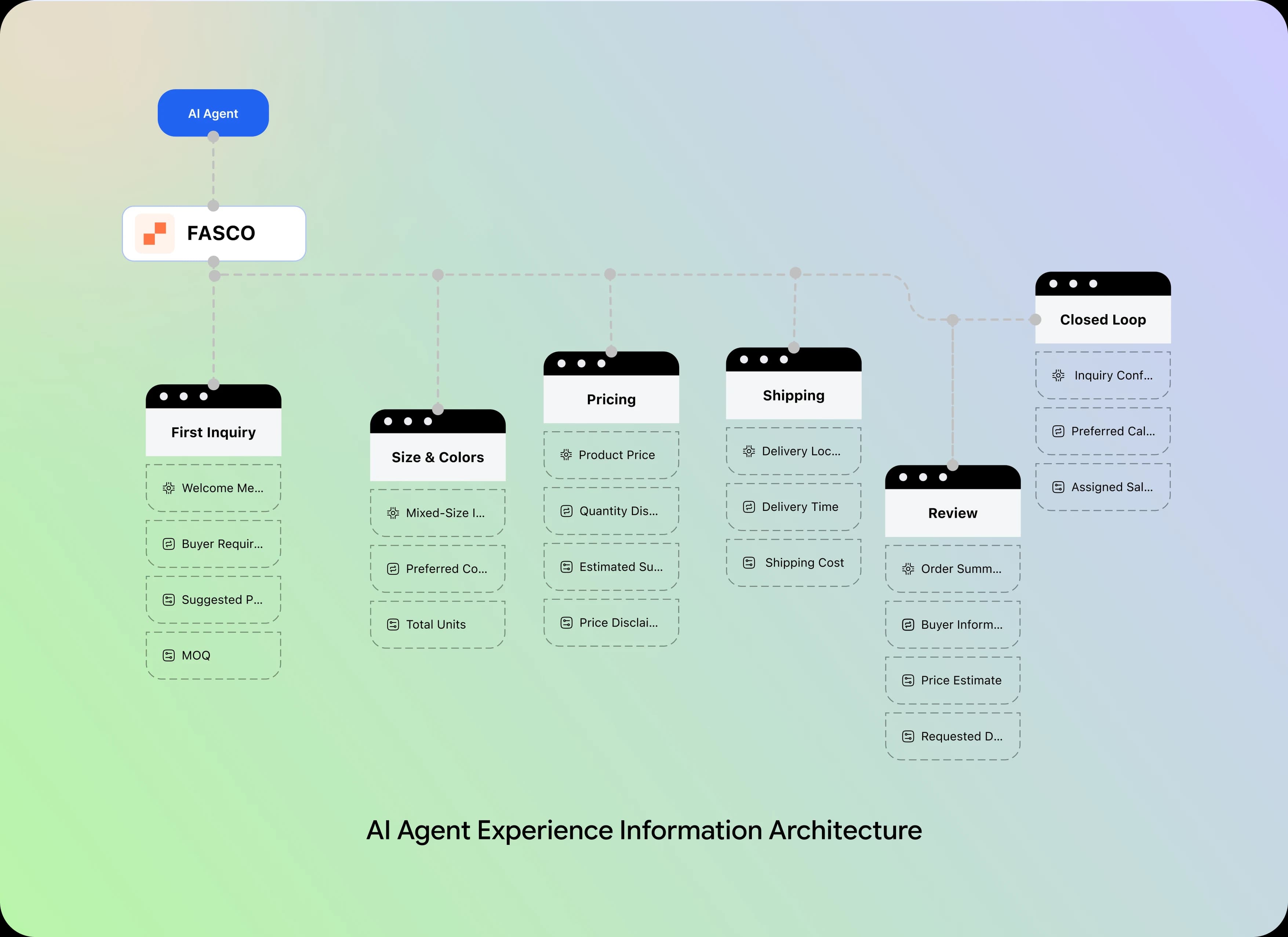
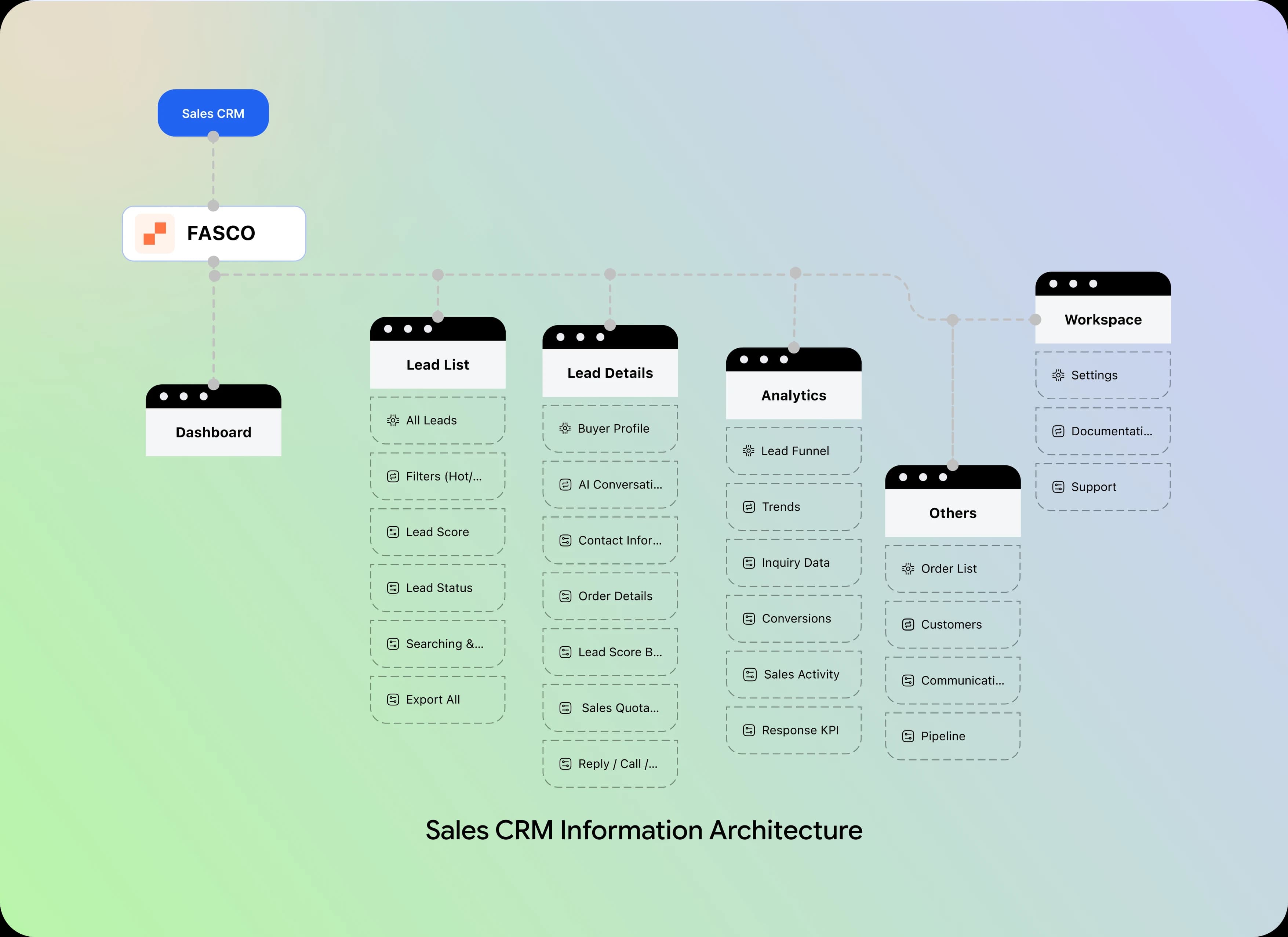
Information Architecture
The structure follows a buyer's journey: discover products, set quantities and preferences, review estimates, share contact details, confirm consent, and hand off to sales.
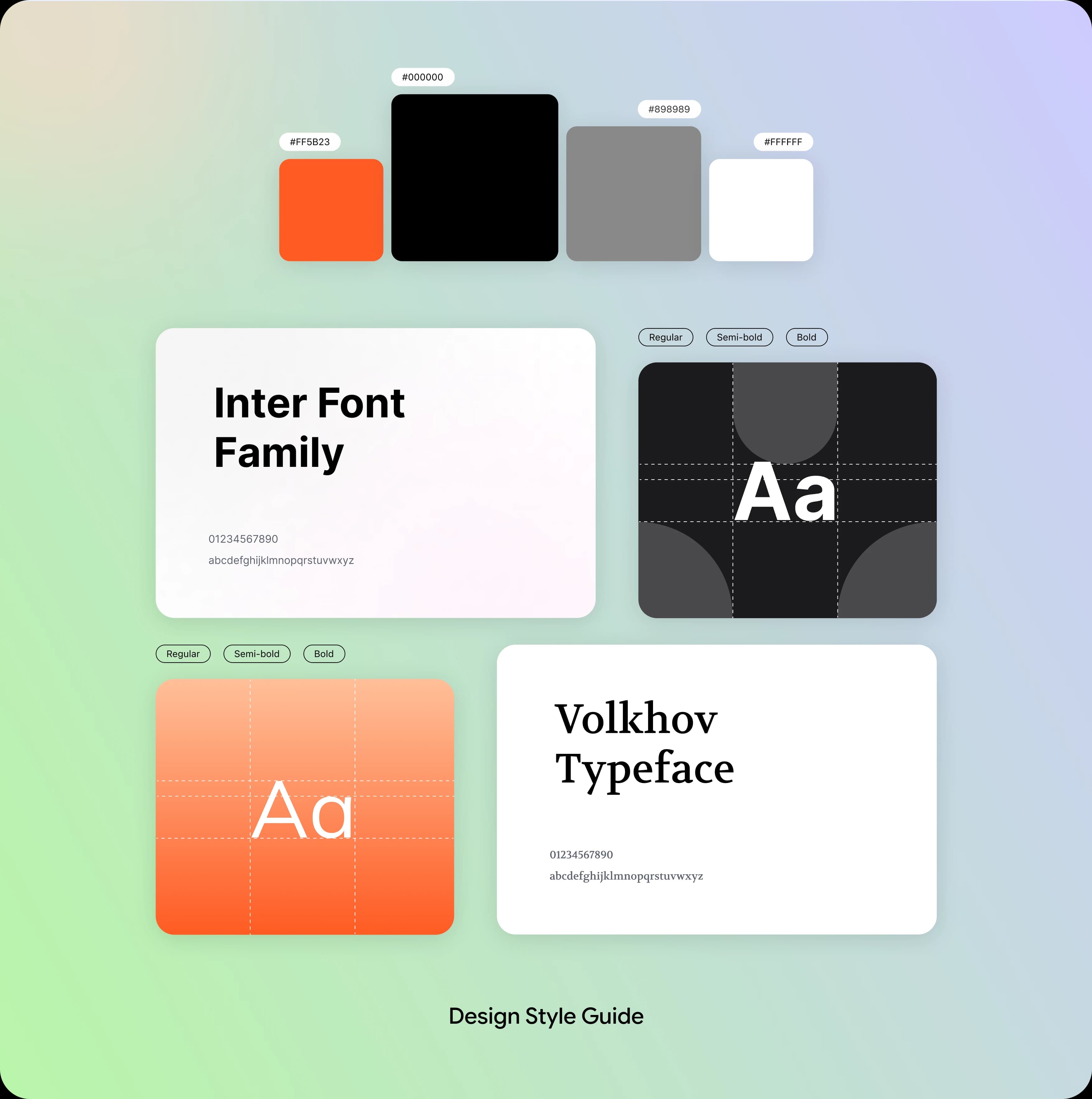
A Design System for Conversational Wholesale Commerce
Consistent storefront typography, product cards, message bubbles, order summaries and statuses keep the buyer journey readable from first inquiry to CRM handoff.
Four Buyer Problems, Four Design Solutions
The AI assistant helps buyers move from product questions to structured wholesale requests. Each design solution addresses a key challenge in the buying journey while keeping buyers in control of the information shared with the sales team.
Problem: Unstructured Buyer Inquiries
Buyers ask about products and minimum quantities across multiple messages, making purchase needs easy to miss.
Solution: AI-Guided Product Discovery
Show relevant products, starting prices and minimum orders within the conversation, right when buyers ask.
Problem: Changing Order Requirements
Quantities, sizes, colors and delivery timing must be clarified before a useful quote can be prepared.
Solution: Structured Order Capture
Collect item counts, product preferences, and shipping needs step by step, then organize them into a clear order summary.
Problem: Unclear Pricing & Delivery
Buyers need to understand estimated costs and delivery expectations before deciding whether to proceed.
Solution: Transparent Pricing & Delivery Guidance
Provide itemized estimates and delivery context while clearly identifying details that require sales confirmation.
Problem: Leads Arrive Without Context
A name and phone number alone do not tell the sales team what the buyer wants or when to call.
Solution: Consent-Based Sales Handoff
Summarize buyer details and order preferences, then request permission before creating a lead for sales review and follow-up.
The Buyer Journey: From First Question to Sales Handoff
The experience connects each interaction into one continuous journey. Buyers can explore products, define order requirements, review an estimate, and decide whether to share their details with sales.
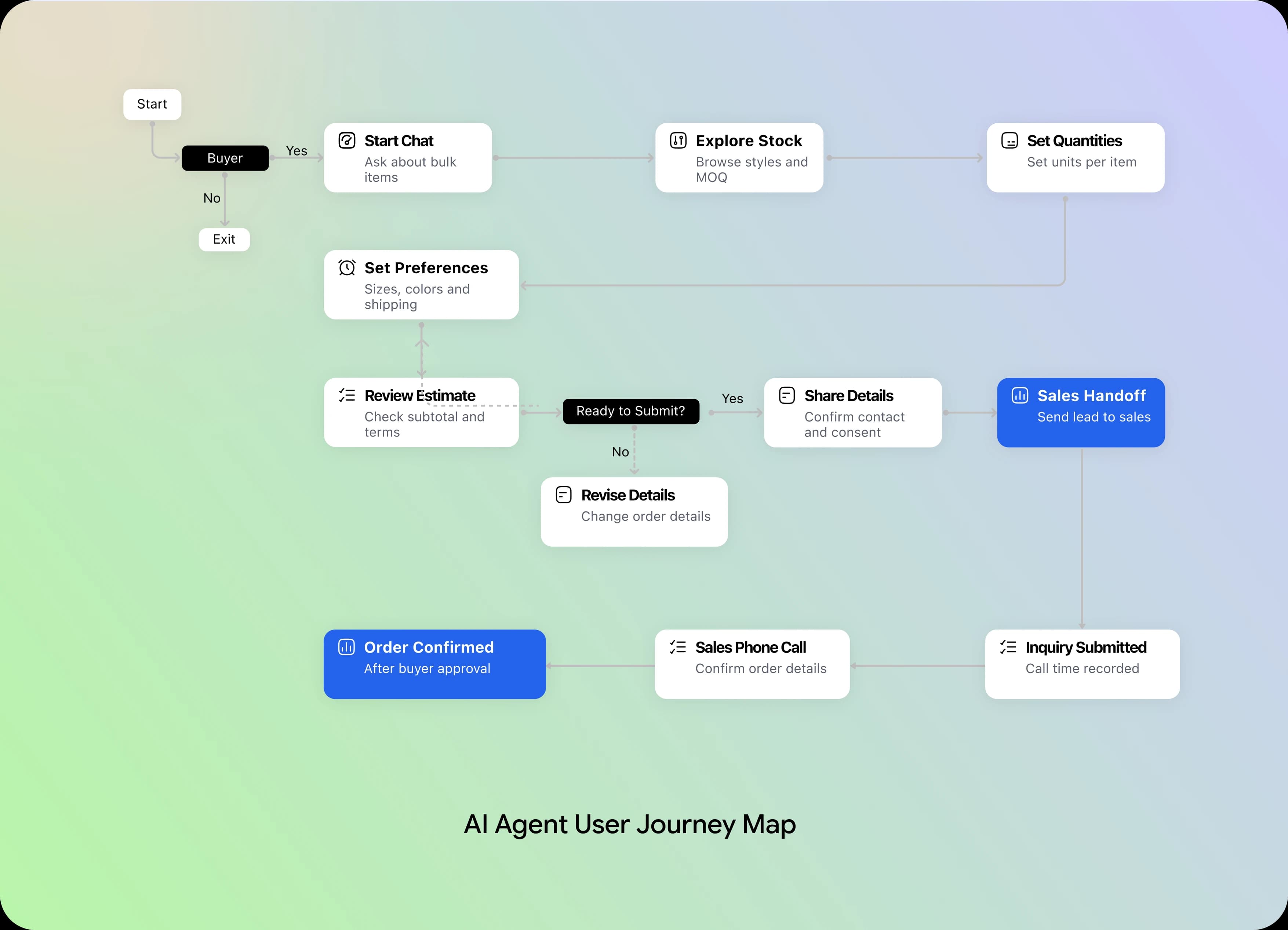
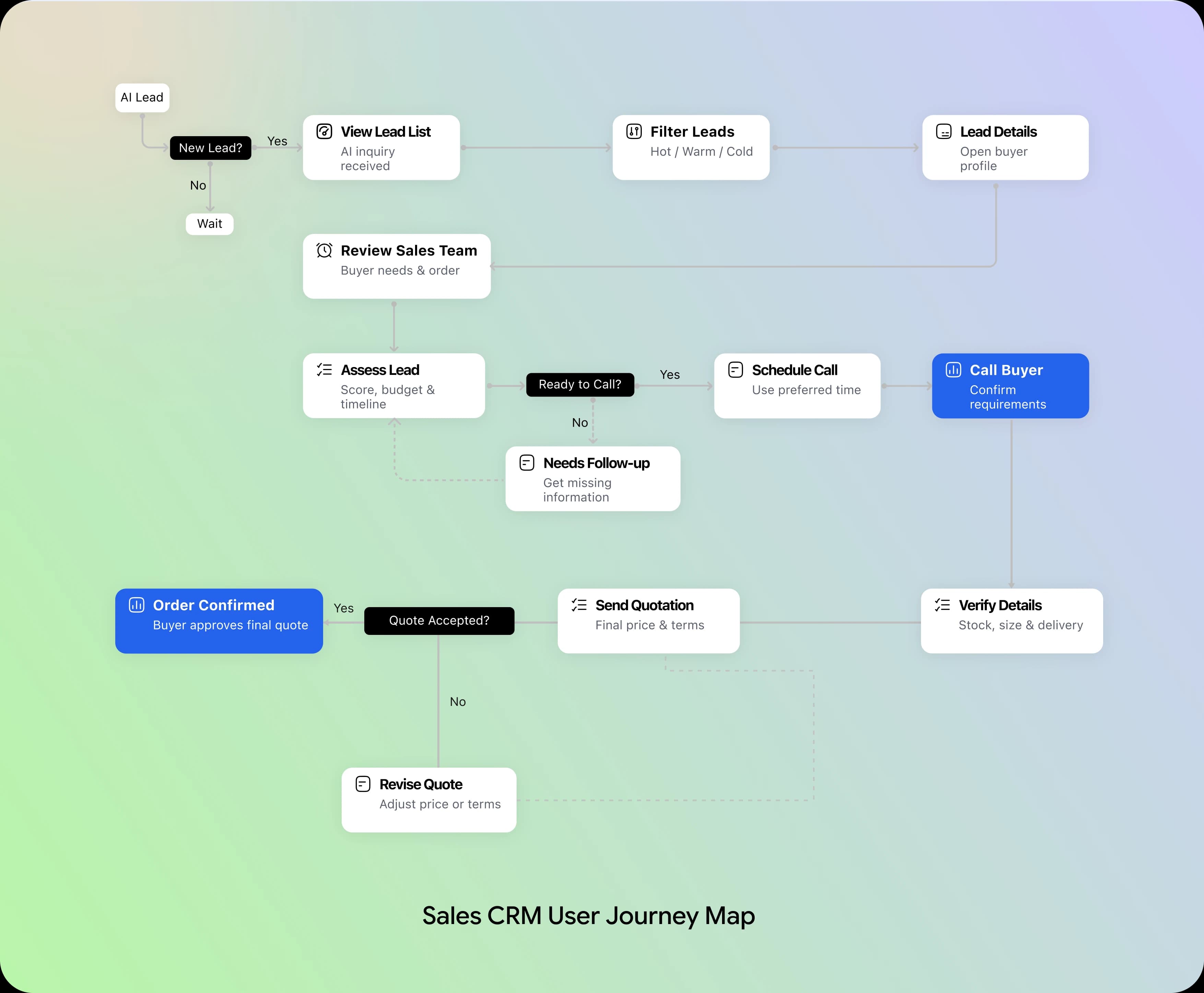
From Buyer Questions to Sales-Ready Leads
The interface moves from wholesale product discovery to guided order capture and human sales follow-up.
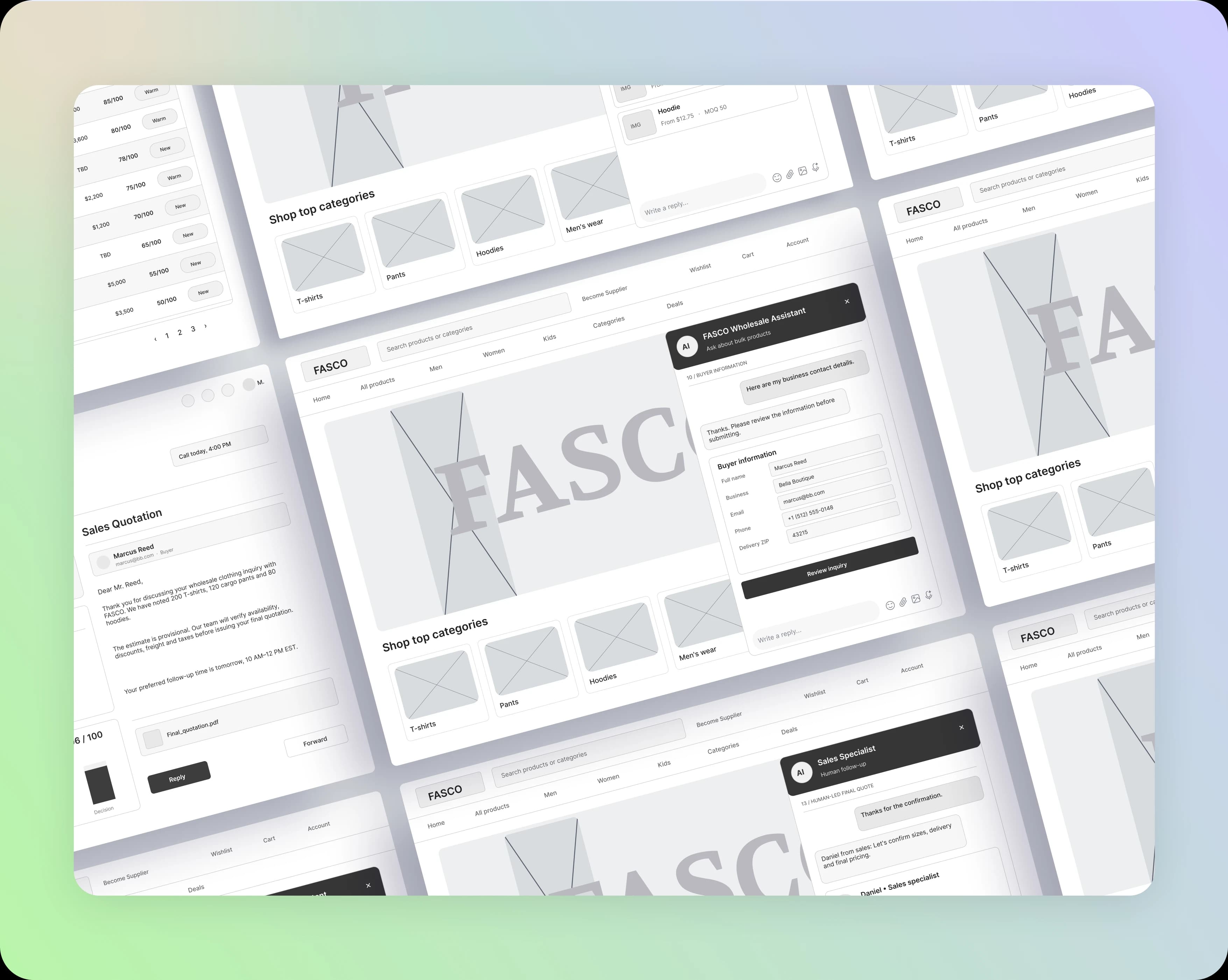
Low-Fidelity Wireframes
The wireframes focused on structure, not visual polish. Without colors or decorative elements, they helped us validate the wholesale buying journey, organize product information, define the conversation flow, and establish how the AI assistant and storefront work together.
High-Fidelity Designs
Six key experiences show how a wholesale inquiry becomes a structured, consent-based sales lead.
The storefront stays visible while chat helps buyers build an order. Structured summaries carry that context into the sales workspace.
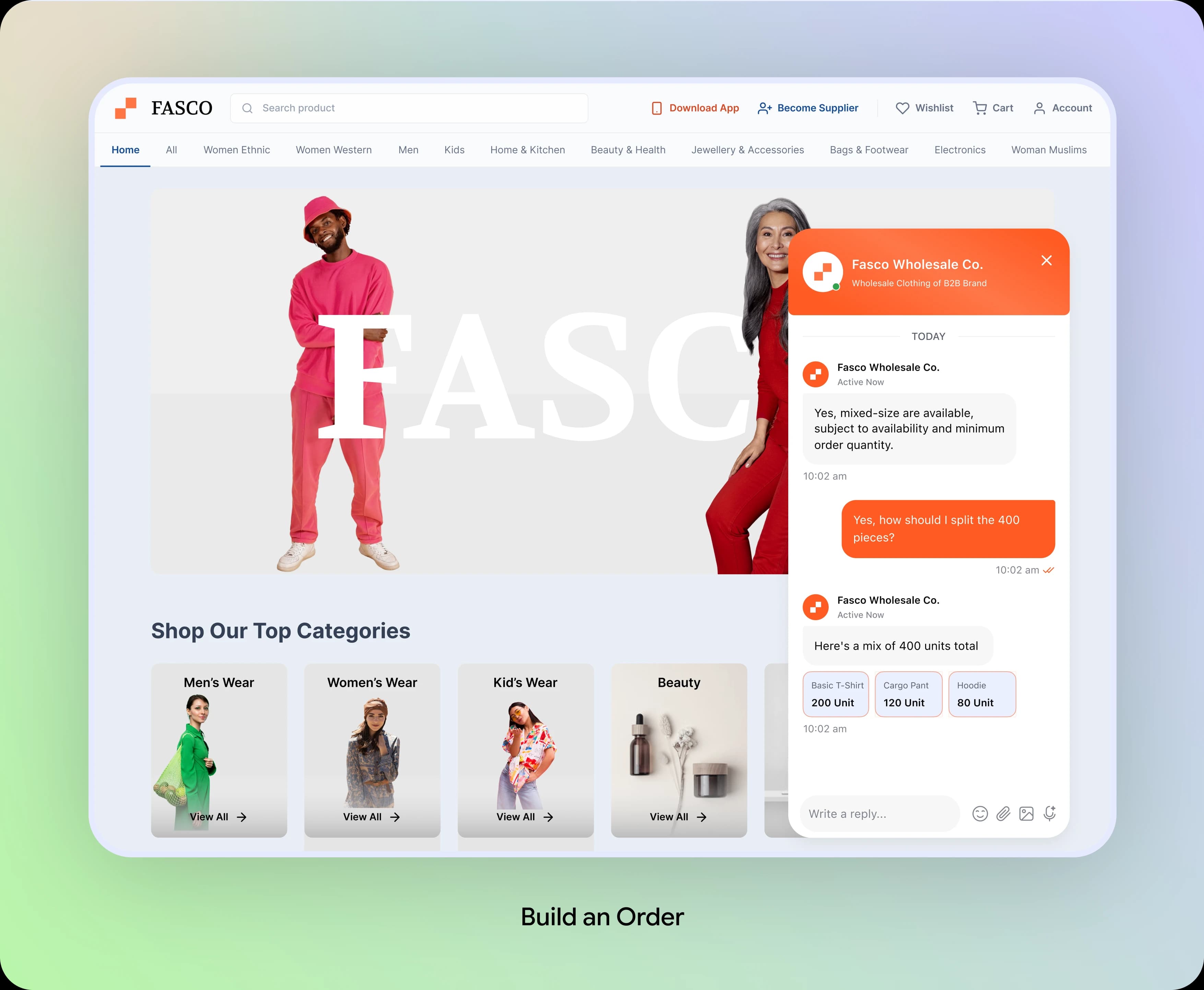
Bulk Quantities: Build an Order Naturally
Buyers can specify quantities across different clothing categories. The assistant brings each item into a single order summary instead of leaving details scattered across messages.
Design Decision:
Keep quantities visible and editable inside the conversation so buyers can confirm their product mix before moving forward.
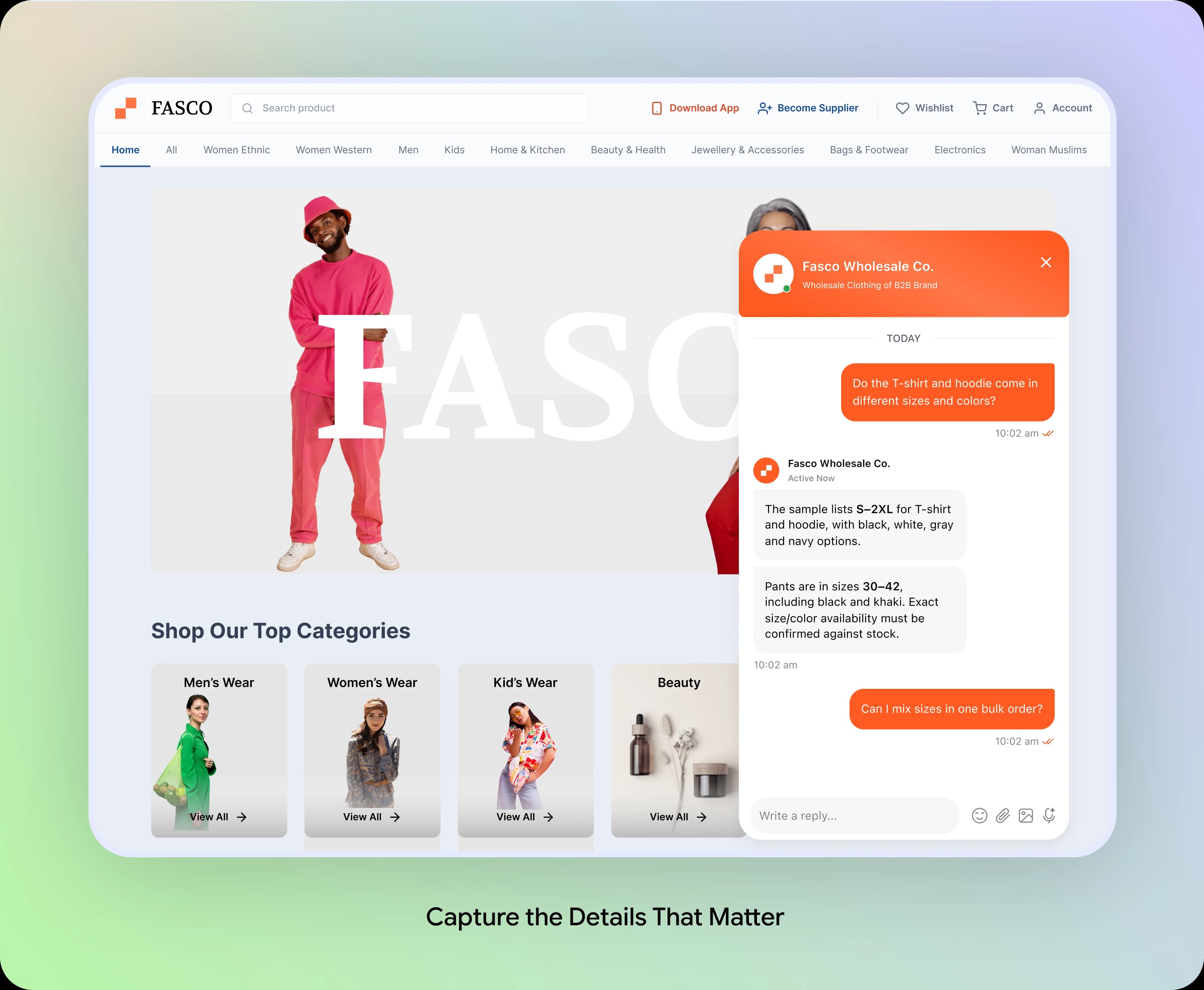
Sizes and Colors: Capture the Details That Matter
Wholesale orders depend on size ranges, color preferences, and stock availability. The assistant captures these requirements through short, contextual questions.
Design Decision:
Ask for details only when they become relevant. Clear confirmation reduces repetition and creates a more useful quote request.

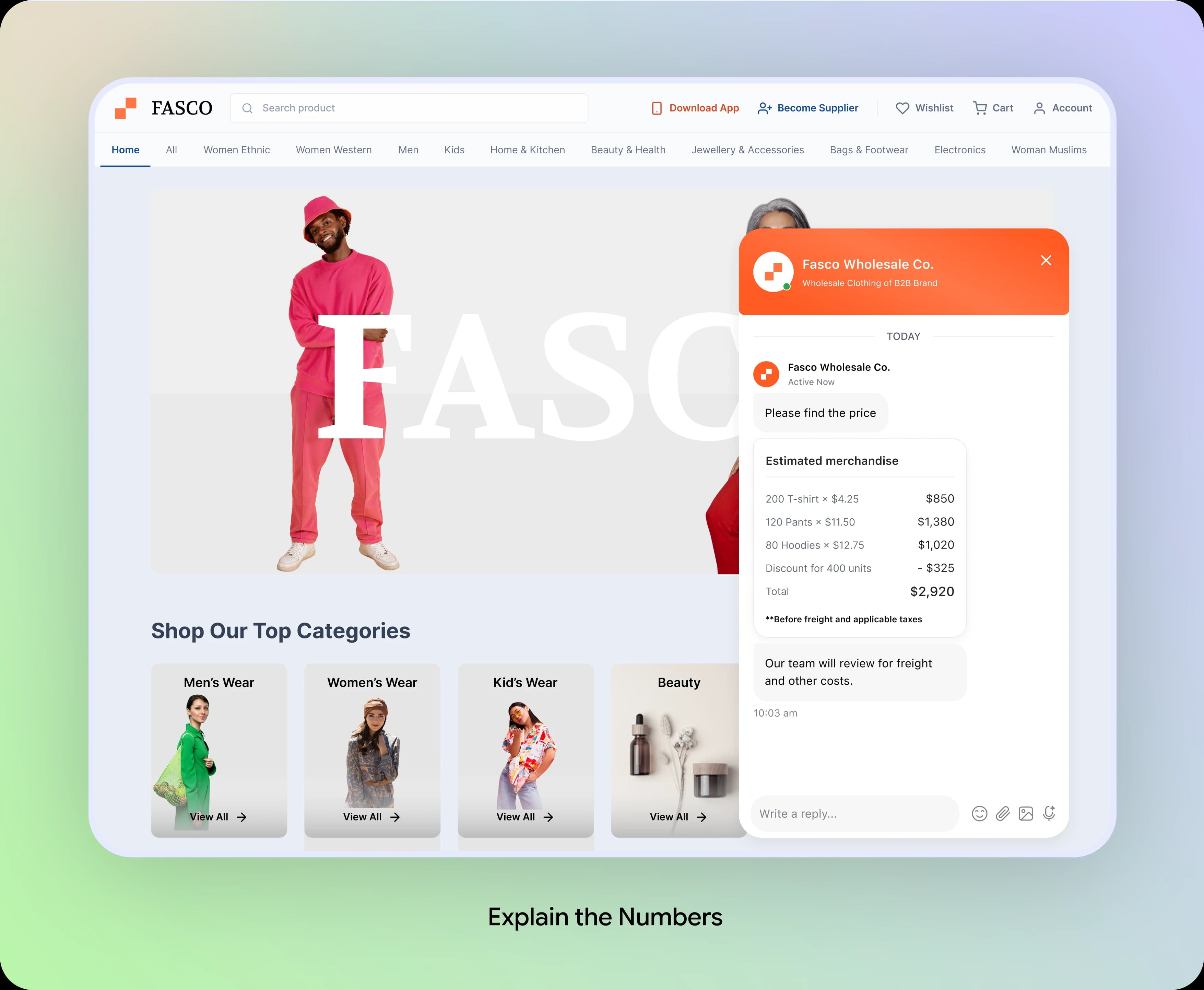
Estimated Pricing: Explain the Numbers
The assistant provides an itemized merchandise estimate and quantity discounts while explaining that shipping, taxes, and stock availability still require confirmation.
Design Decision:
Present the estimate and its limitations together. Clear assumptions help buyers make informed decisions without mistaking an estimate for a final quote.
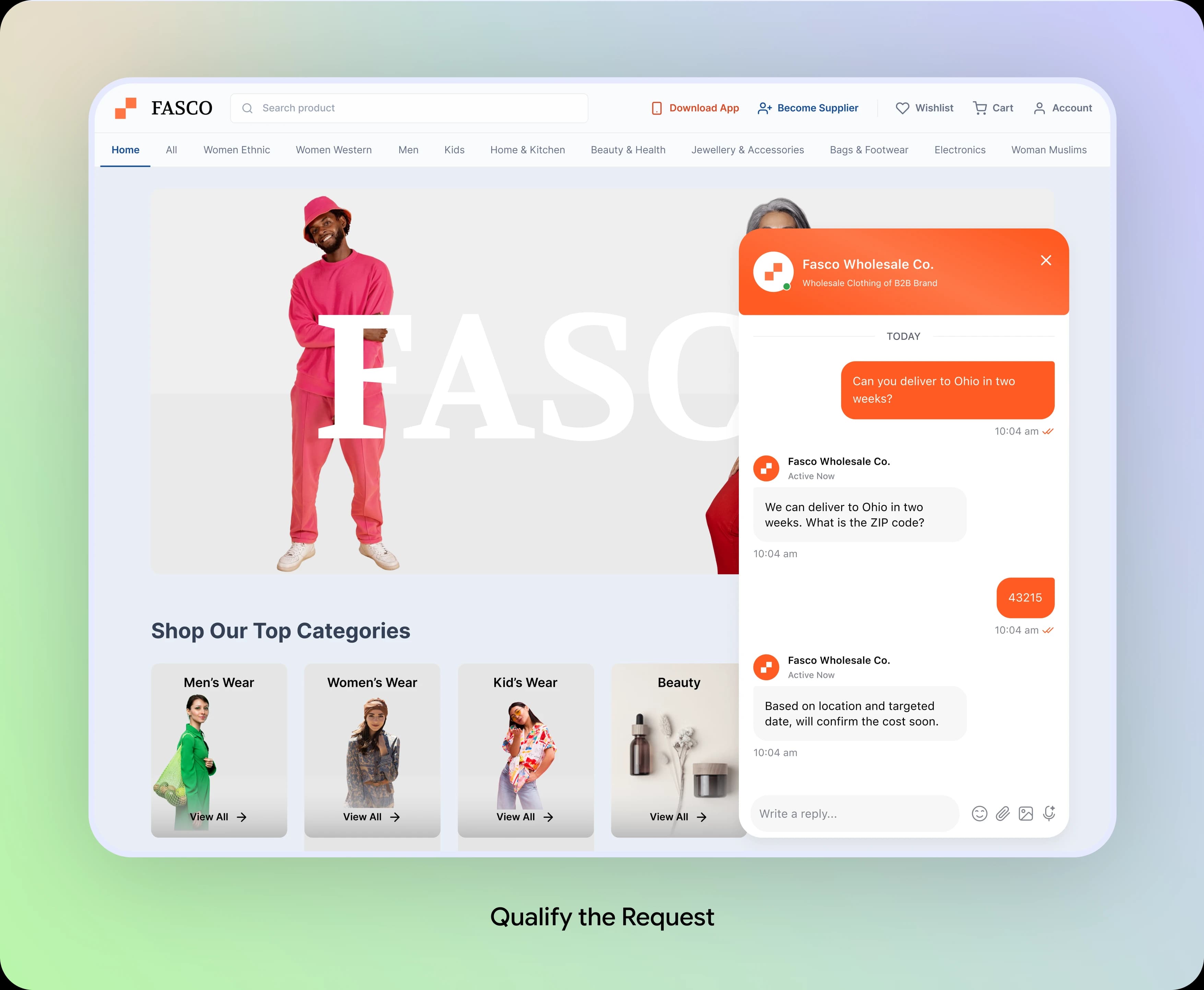
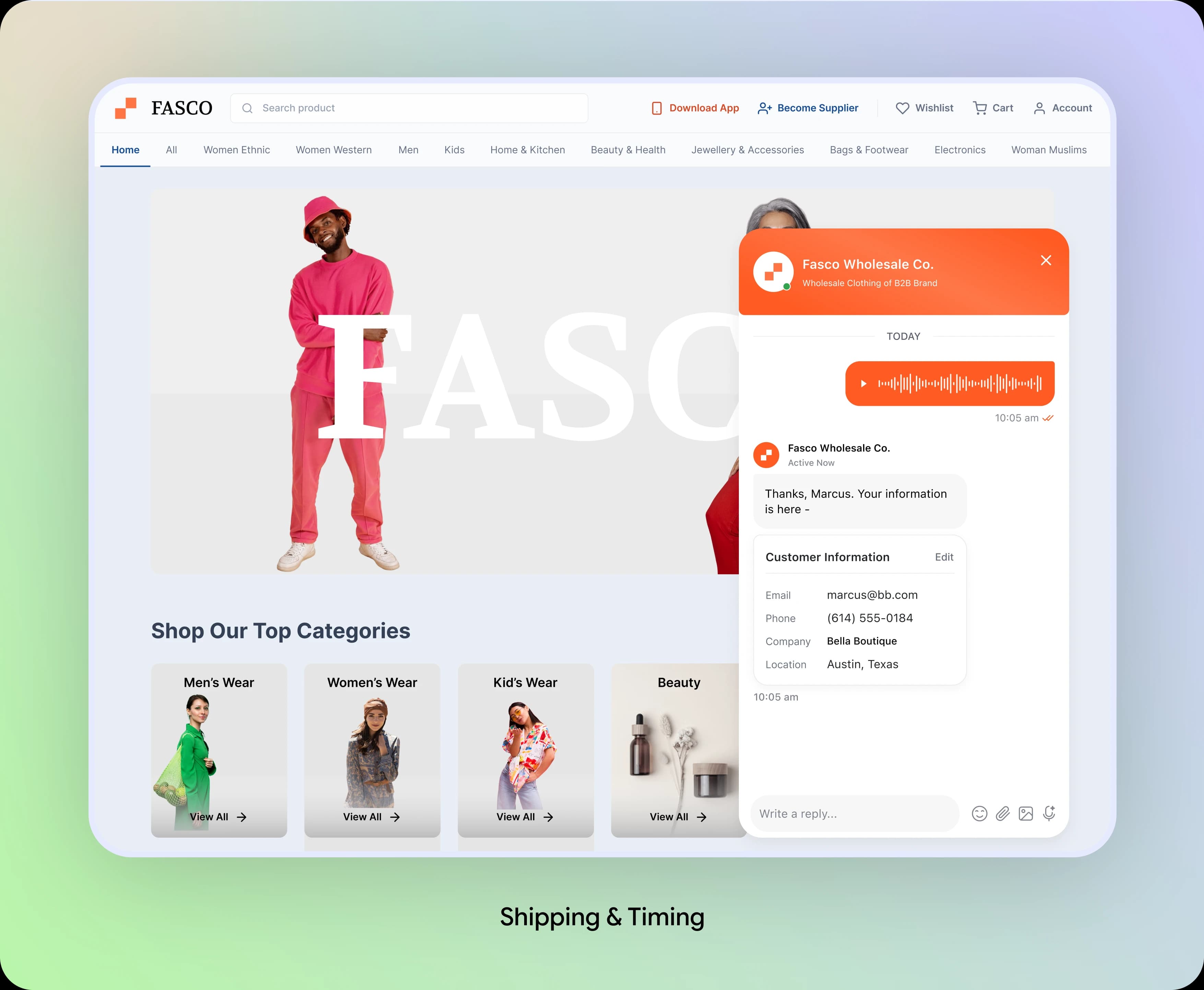
Shipping & Timing: Qualify the Request
The assistant asks where and when the buyer needs the order delivered, then collects contact details so the sales team can confirm the requirements.
Design Decision:
Collect location and timing before handoff. Keep estimated fulfilment separate from a confirmed delivery commitment.
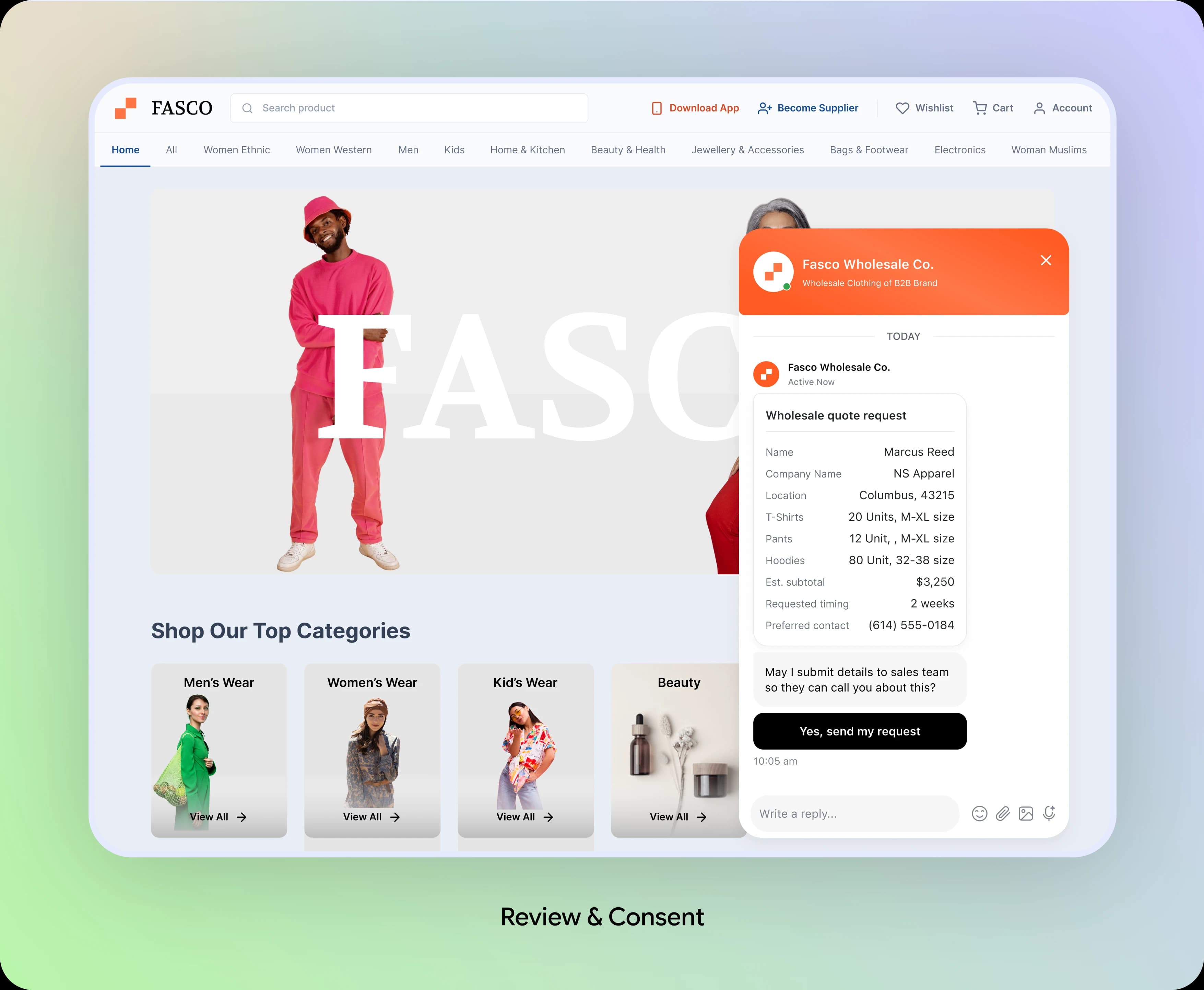
Review & Consent: Let Buyers Approve
Before submission, the assistant summarizes products, quantities, preferences, estimated pricing, and contact details. Buyers can review the information and decide whether to share it with sales.
Design Decision:
Make the request understandable before submission. Explicit consent keeps buyers in control of when their details reach the sales team.
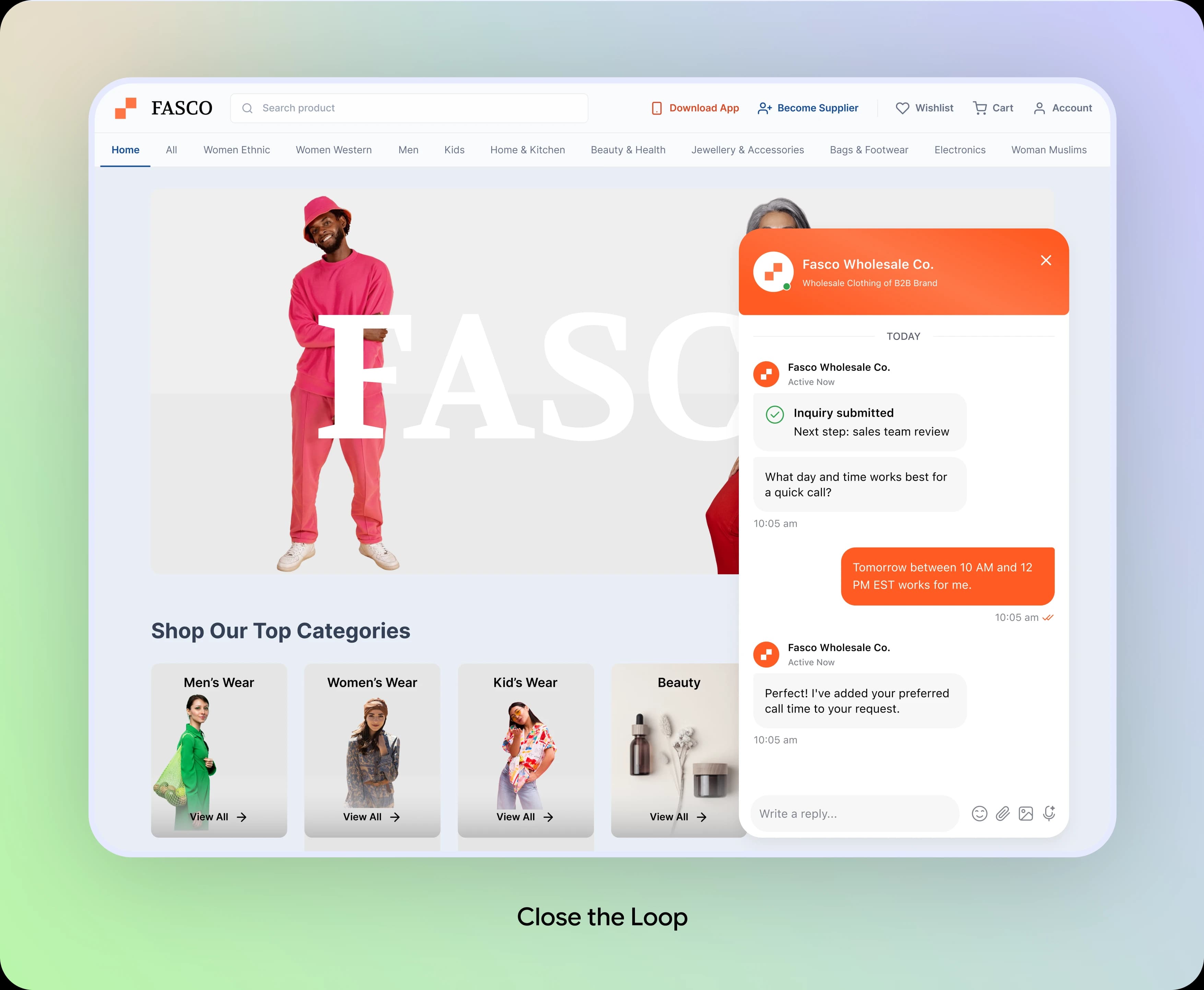
Sales Handoff: Close the Loop
After submission, the assistant confirms the request and asks for convenient time for call. Sales team receive the lead with its order context in the CRM.
Design Decision:
Treat lead capture as a handoff, not a completed order. Confirm the next step and give sales the information needed for a relevant follow-up.
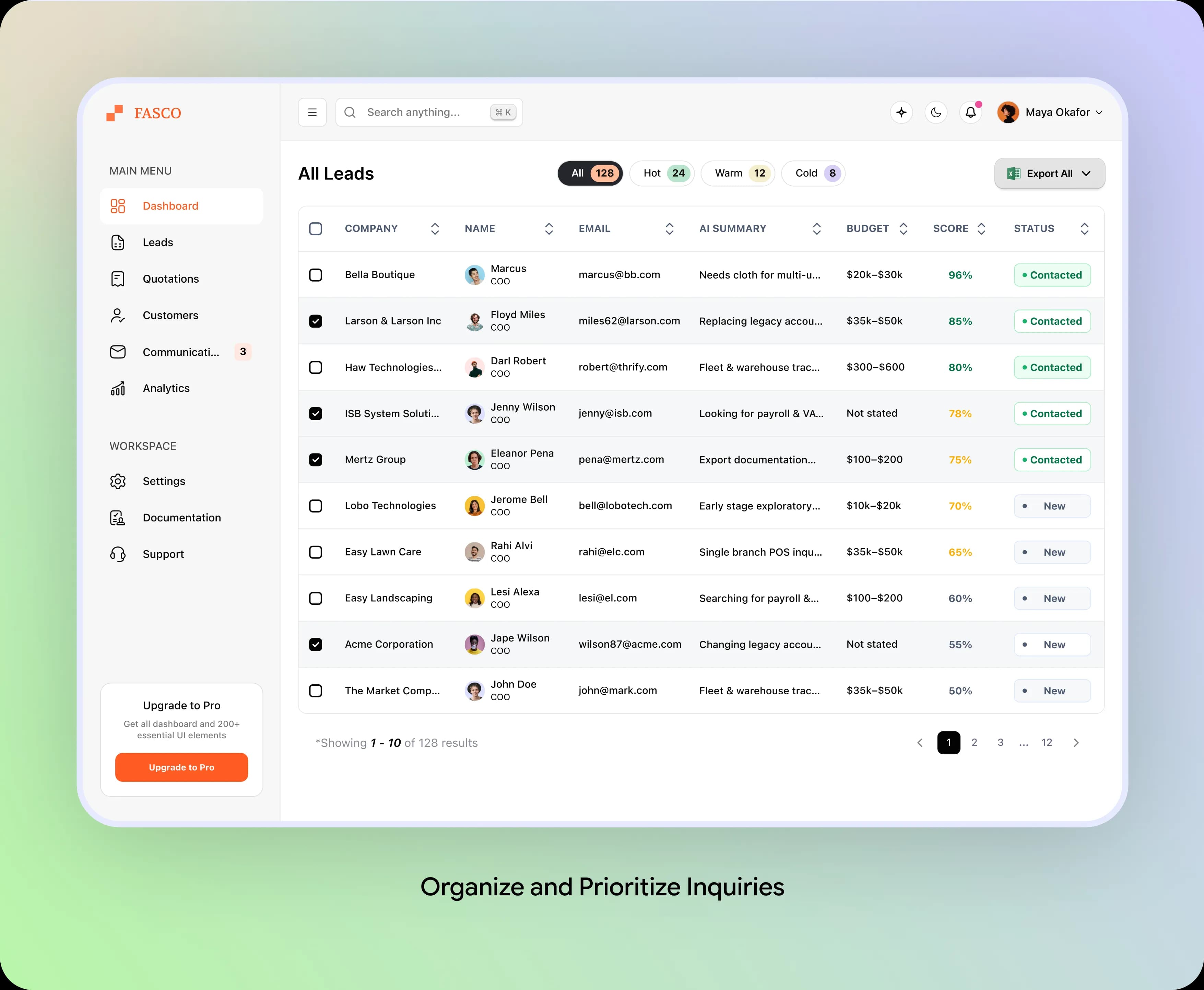
Lead Management: Organize and Prioritize Inquiries
The leads dashboard brings buyer inquiries into one workspace. Sales teams can review AI-generated summaries, company details, budgets, lead scores, and statuses to understand each opportunity and prioritize follow-up.
Design Decision:
Keep essential lead information visible in one table. Use lead categories, scores, and status indicators to help sales teams identify opportunities and manage their pipeline efficiently.
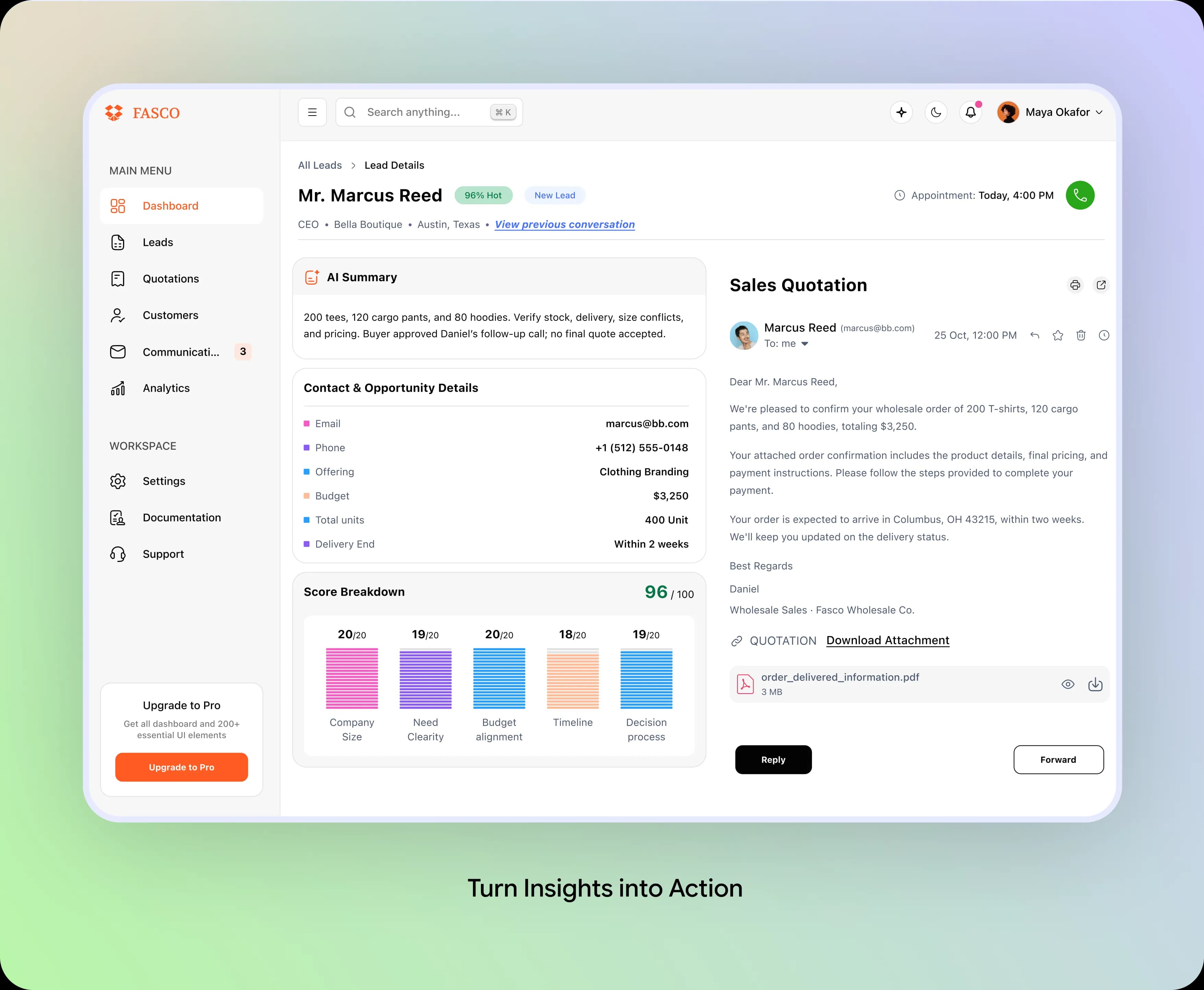
Lead Details & Quotation: Turn Insights into Action
The lead detail view combines an AI-generated summary, contact information, opportunity details, and a lead score breakdown. Sales team can review the buyer's requirements, prepare a quotation, and coordinate follow-up from one workspace.
Design Decision:
Connect buyer context with sales actions. Present key opportunity details alongside quotation and communication tools so sales teams can make informed decisions and follow up with confidence.
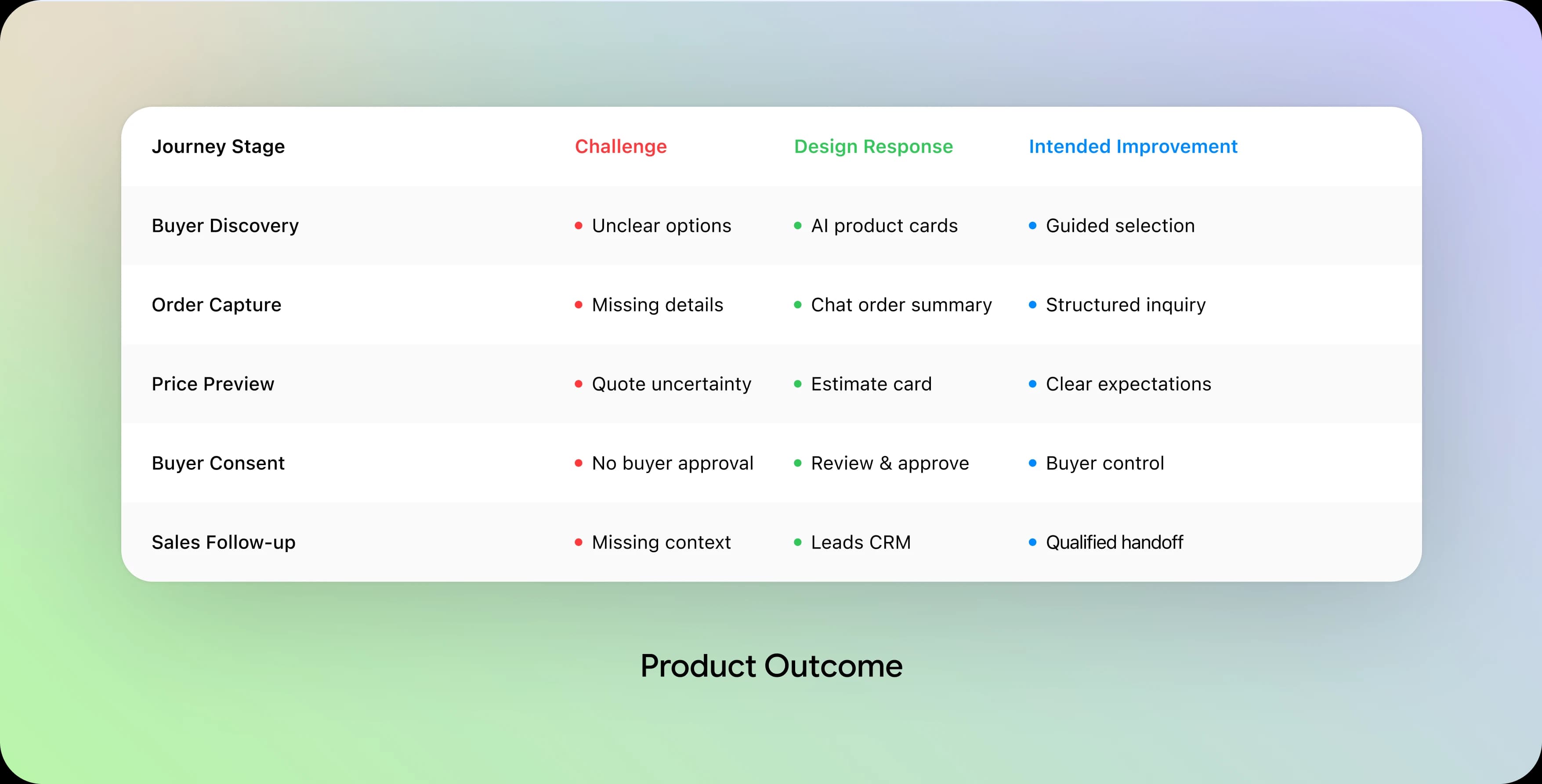
The Product Outcome: Qualified Wholesale Inquiries
The proposed FASCO experience connects product discovery, bulk order capture, estimates, buyer consent, and sales follow-up within one coherent journey.
The screens show intended workflow improvements, not verified conversion increases or measured sales results.
What This Interface Offers

What We Would Build Next
The current experience establishes the foundation for more connected buying and sales process. Following opportunities could extend it further:
Live Stock & Availability
Show availability confidence and explain where a sales confirmation is still needed.
Sales-Ready Quote Workflow
Help the sales team refine estimates and prepare a final quote from collected order details.
Conversation-to-CRM History
Keep buyer preferences, consent, and sales notes together to support more reliable follow-up.
What This Project Taught Us
Designing a conversational wholesale experience reinforced four lessons about connecting AI interactions with human sales workflows.
Follow Buyer Intent
Answer product questions first, then ask for information that moves the order forward.
Capture Order Context
Keep quantities, sizes, colors, prices, and delivery needs visible throughout the inquiry.
Keep People in the Loop
AI can prepare a qualified lead, while sales specialists confirm availability, price, and the final order.
Measure Real Outcomes
Track lead quality, inquiry completion, and sales follow-up before claiming conversion gains.
Next, test the journey with wholesale retailers and sales team—from the first question and estimate to review, consent, and follow-up.
Special Note:
This case study is based on a real client engagement. Certain identifying details have been omitted due to confidentiality requirements.
Thanks For Reading
Explore More Client Transformations
Recruiters Spend Huge Time for Screening Candidates. Here's How We Fixed It.
View Details
Solving Data Quality Issues in CRM for High-Growth Teams
View Details